Invoice with VAT
Lemon Squeezy is the merchant of record. Enter your VAT number at checkout: EU VAT is reverse-charged and the invoice arrives by e-mail.
One key for the whole office. Run every computer from one policy file, send files on their own when they land in a folder, and keep an audit trail of every transfer. No server of ours, no cloud in between.
Subscriptions from €2.50 per computer a month, billed yearly · one-time seat packs from €6.98 per computer · macOS, Linux and Windows
A subscription runs the whole fleet: central policy, automation, the Hub, audit. A one-time seat pack just unlocks Pro on many computers. Both mix Macs, Linux and Windows under one key.
25 computers · €2.50 per computer a month
25 computers · €5 per computer a month
Billed yearly, VAT reverse-charged with your EU VAT number. Online checkout opens soon; until then the buttons send us an e-mail and we invoice you. Cancel any time: the computers keep the free version and nothing is deleted. Want to try first? Ask for a 30-day trial key.
10 computers · €9.90 each
25 computers · €7.96 each
50 computers · €6.98 each
| Feature | Pro · seat packs | Team | Business |
|---|---|---|---|
| Send, receive, encryption, PIN pairing | ✓ | ✓ | ✓ |
| Folder sync, queue, groups, phone QR, full history | ✓ | ✓ | ✓ |
| One key for many computers, silent installation | ✓ | ✓ | ✓ |
| Central policy: computers and groups for everyone | – | ✓ | ✓ |
| Receive rules: senders, file types, size, folder | – | ✓ | ✓ |
| Switch features off (phone, sync, text, AI) | – | ✓ | ✓ |
| Hot folders and actions on arrival | – | ✓ | ✓ |
| Local HTTP API | – | ✓ | ✓ |
| LAN Share Hub on your own server | – | ✓ | ✓ |
| Audit search in the Hub | – | – | ✓ |
| Audit log to a folder or syslog, CSV/JSON export | – | – | ✓ |
| Signed webhooks | – | – | ✓ |
| Priority support | – | – | ✓ |
| Price per computer | €6.98–9.90 once | €2.50 / month | €5 / month |
Write the rules once, push policy.json with your MDM next to the licence key, and every computer follows them on its next start.
.exe or scripts, cap the size, send everything to one folder.lanshare policy check policy.json finds typos and mistakes.{
"hosts": [
{ "name": "File server", "address": "10.0.0.10",
"group": "Servers", "trusted": true },
{ "name": "Design iMac", "address": "design.local",
"group": "Studio" }
],
"require_encryption": true,
"receive": {
"only_from": ["10.0.0.0/16"],
"blocked_extensions": ["exe", "msi", "sh"],
"max_bytes": 20000000000
},
"disable": ["phone"],
"speed_limit": 200
}
Hand the routine work to LAN Share: folders that send, scripts that react, an API for everything else.
POST /v1/send from any script or program on the computer, protected by a token.$ curl -H "Authorization: Bearer $TOKEN" \
-d '{"to": "Servers", "paths": ["/srv/reports/2026-11.pdf"], "message": "Monthly report"}' \
http://127.0.0.1:45822/v1/send
Who sent what to whom, when, how big, whether it was encrypted and which key the other computer used. Including what the policy refused, and why.
lanshare audit export --days 90 --format csv for the yearly review.{"event":"received","at":"2026-11-03T09:14:02+00:00",
"computer":"DESIGN-MAC","user":"anna",
"peer":"Build server","address":"10.0.0.7",
"items":["release-0.9.0"],"files":214,
"bytes":2147483648,"encrypted":true,
"fingerprint":"4EY3-AR3O-MDE5-FMWK",
"status":"done"}
{"event":"rejected","at":"2026-11-03T09:20:41+00:00",
"computer":"DESIGN-MAC","peer":"Guest laptop",
"items":["setup.exe"],"status":"rejected",
"error":"refused by policy: setup.exe: this
type of file is not accepted here"}
A small console you run on your own server or NAS: lanshare hub serve, or in Docker (built from hub/Dockerfile) behind your own HTTPS proxy. Everything stays in a folder on your server, nothing goes through ours. Computers join with one command, check in every 5 minutes and pick up policy changes without MDM; with Business, every transfer lands in its audit search.
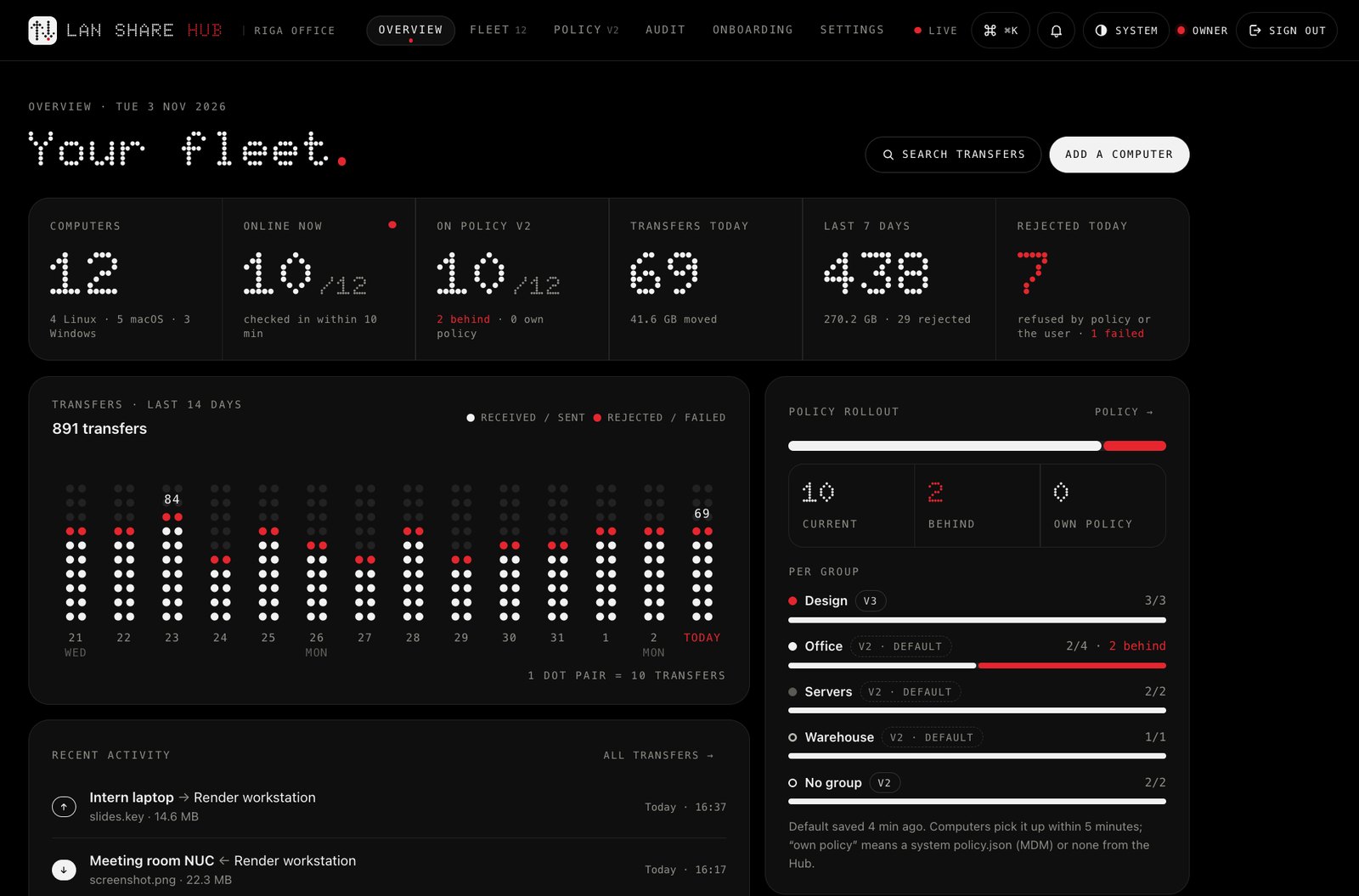
Every computer, the policy rollout per group and a dot-matrix chart of transfers per day.
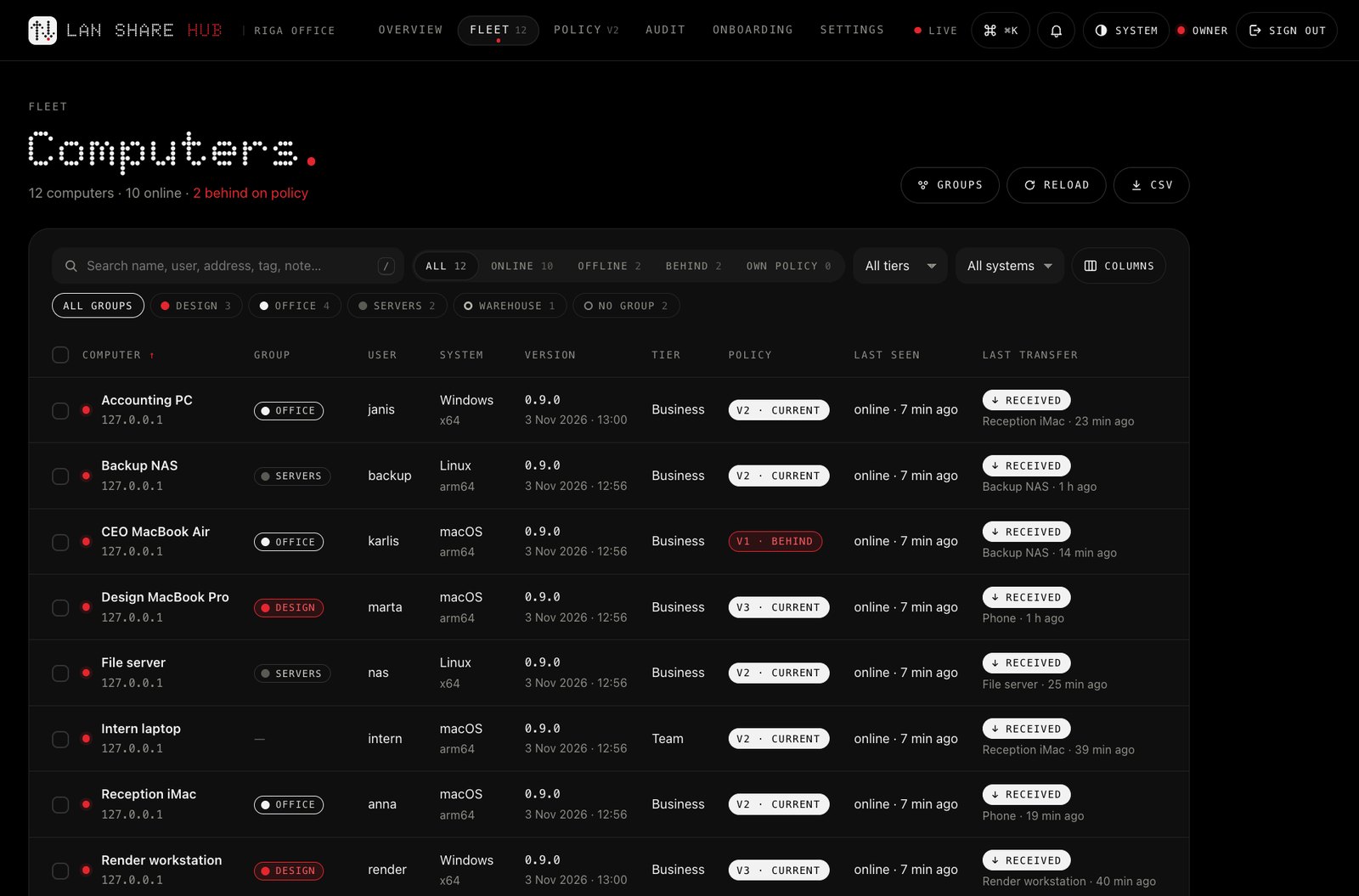
Search, filter by group, tier or system; see who is behind on the policy and when each computer was last seen.
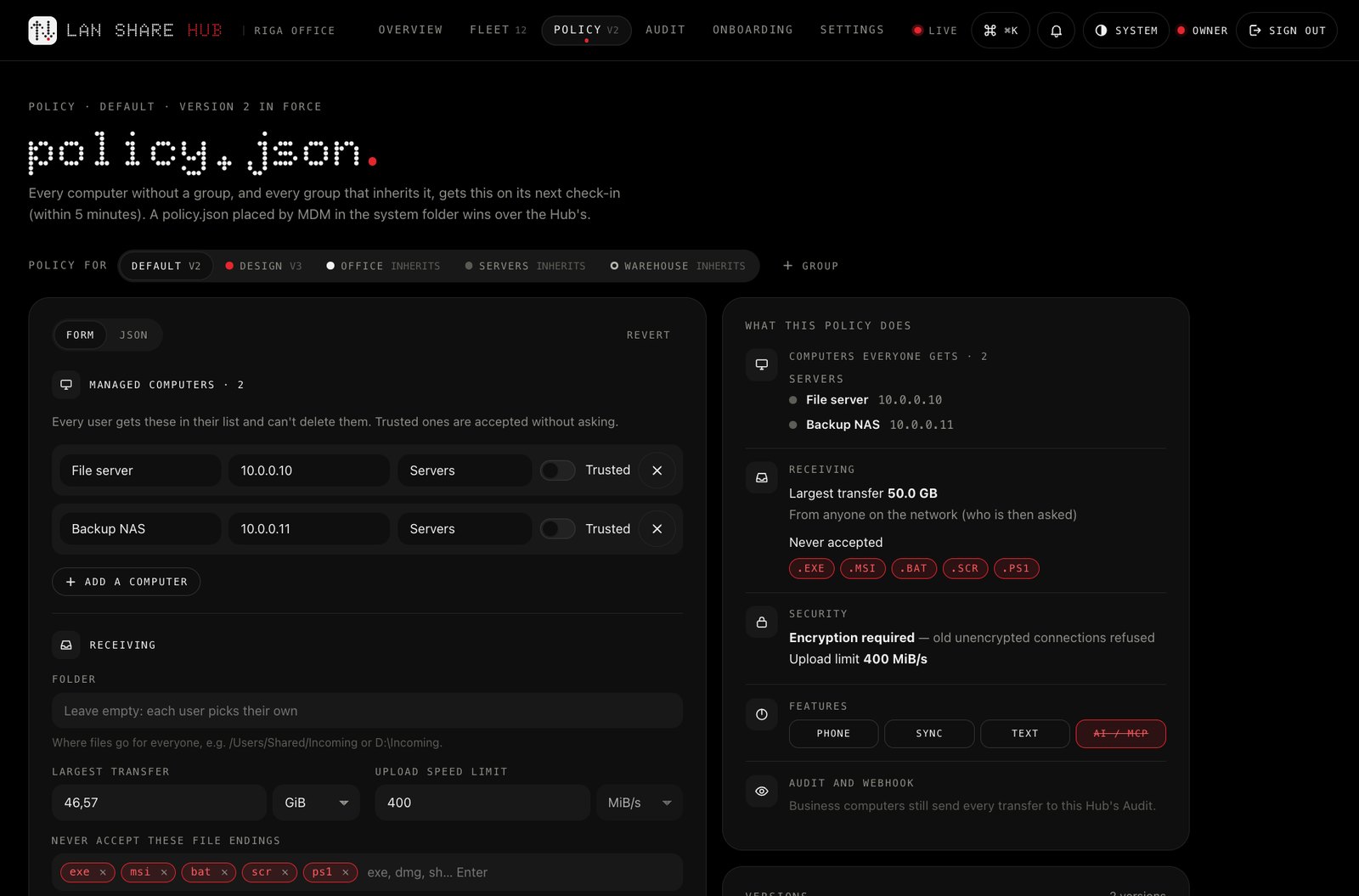
Edit the policy as a form or as JSON, per group, validated as you type, with versions you can compare and restore.
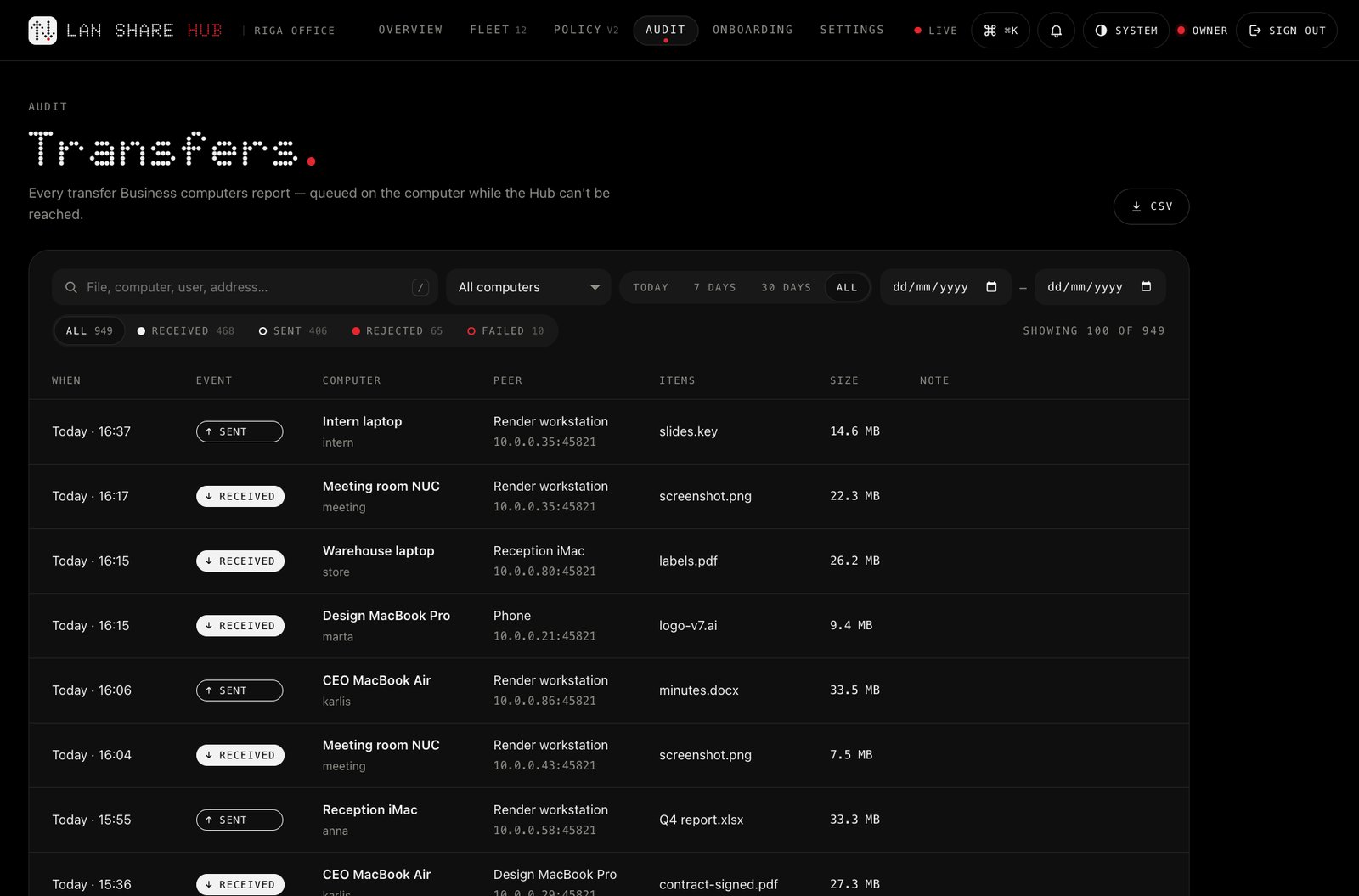
Every transfer of every Business computer, searchable by text, computer, event and date, with CSV export.
Install LAN Share as usual, then put the key (and, with a subscription, policy.json) where the app looks for them. On its next start it activates itself, names the seat after the computer and applies the policy.
LANSHARE_LICENSE_KEY), and policy.json next to it.$ mkdir -p "/Library/Application Support/LAN Share" $ echo "YOUR-KEY" > "/Library/Application Support/LAN Share/license-key"
$ echo "YOUR-KEY" | sudo install -D -m 644 /dev/stdin /etc/lanshare/license-key
> New-Item -ItemType Directory -Force "$env:ProgramData\LAN Share" | Out-Null
> Set-Content "$env:ProgramData\LAN Share\license-key" "YOUR-KEY"
$ lanshare license activate YOUR-KEY
$ lanshare license status
Activation fails (every seat taken, no network)? It tries again the next day; nothing is shown to the user.
No accounts with us and no cloud in the path. A seat pack needs nothing to run; with a subscription, the Hub is optional and runs on your own server.
Lemon Squeezy is the merchant of record. Enter your VAT number at checkout: EU VAT is reverse-charged and the invoice arrives by e-mail.
A key file or an environment variable. The app activates itself on the next start, names the seat after the computer and retries quietly if it must.
Replace a laptop? lanshare license deactivate on the old one frees the seat. Reinstalling the same computer never takes a second seat.
Each computer checks the licence about once a week and keeps every feature for 30 days without a connection.
Files go straight between your computers, encrypted (Noise, ChaCha20-Poly1305) and checked with SHA-256. Nothing is uploaded anywhere.
TCP and UDP 45821 on the LAN (changeable). Outside calls: the licence check with Lemon Squeezy (the key and the computer's name), the daily update check to lanshare.io (can be switched off), and your own Hub, if you run one.
A one-time seat pack is Pro for an organisation: it unlocks the Pro features on that many computers, forever. A subscription adds what an IT team needs to run them: the central policy, automation, the API, the Hub and, with Business, the audit log and webhooks.
The computers fall back to the free version: they still send and receive, nothing is deleted, the policy simply stops being applied. Renew and everything is back.
No cloud, and no server of ours. The policy is a file, the audit log goes to your own folder or syslog server, and files still go straight between your computers. The Hub is optional and runs on your own server. Outside calls: the licence check with Lemon Squeezy (the key and the computer's name) and the update check to lanshare.io, which you can switch off.
Yes. Request a quote with your company details; you get an invoice to pay by transfer and the key as soon as the payment arrives.
Ask for a quote with the number of computers. Larger fleets are priced per computer, below the 50-computer price.
Yes: ask for a 30-day trial key for your team. The free version also works without a key, on any number of computers.
One computer with the key activated, whoever uses it. Phones and tablets that use the QR page don't count.
In the Lemon Squeezy customer portal (each seat is named after its computer), and with lanshare license status on a computer.
It's a paid app for personal use: every Pro feature, no key. It has no organisation features (no policy, Hub, audit, webhooks, hot folders or local API) and no terminal command. For a managed fleet, use the download from this site. The differences: editions.
On the licence terms page.
Tell us how many computers, your company name, address and VAT number. You get an invoice, and the key the moment it's paid.